Subscribe a baseline
A subscription unlocks the energy audit and its reports for one baseline.
For: Subscriber (the baseline's owner)Where: Home › Baseline Controller › Subscription, then Billing and Plans
Steps
- On Home, click the baseline’s card to select it, then open the Subscription tab in the Baseline Controller.
- Click Add to subscription list and confirm.
- Open Billing and Plans in the left menu. Your baselines are listed under Buildings ready to subscribe.
- Choose a plan. If you have a promo code, enter it under Promo code and click Apply. Then click Subscribe.
- Enter your payment details, then click Start Free Trial (Professional plans) or Pay Now (All-In-One Plan).
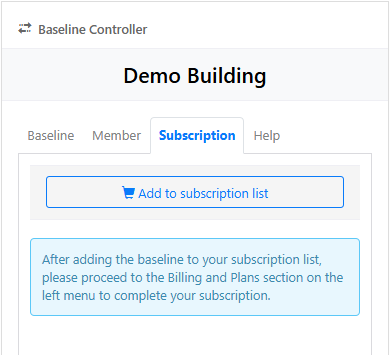
To take a baseline off the list, click Remove from subscription list on its Subscription tab.
What you’ll see next
Professional plans start with a 3-day free trial. Once the baseline is subscribed, the Energy Audit page no longer shows the Not subscribed banner, and you can run the energy audit.
Invoices
Invoices are on the Invoice tab of Billing and Plans. Select an invoice under Billing history to view it, and click Download PDF to save it.
If something goes wrong
My total is over $2,400
For security, a single payment must be under $2,400. Subscribe some of the baselines first and the rest separately.
The Energy Audit page says "Not subscribed"
The baseline has no active subscription, so the energy audit and its reports are limited. Subscribe it with the steps above.