
Before the measures are installed
Until the measures are installed, the Savings Tracking page shows what they would save with the last 12 months’ actual weather, updated each month, and reminder emails say what is being missed.
For: AnalyzerWhere: Analysis › Savings Tracking
What the page shows
Once the audit is posted and before tracking starts:
- Tiles - Potential savings and Utility cost over the last 12 months with their actual weather, and the Retrofit cost and Payback of the selected measures. Until the first monthly estimate, the potential savings and the utility cost are the audit’s, for a typical year.
- The selected measures aren’t installed yet - What the measures would have saved a month with the last 12 months’ weather and, once the audit has been posted for more than a month, how much hasn’t been captured since then. Start tracking is here; see Start tracking.
- Estimated monthly utility cost - A chart of each of the last 12 months, Without the measures and With the selected measures, and when it was last updated.
- Selected measures - The audit’s measures with their cost savings a year (from the audit, typical weather), their costs before and after incentives, and all of them Together as the model calculated them together.
- Reminder email to the building owner - How often the reminder is sent.
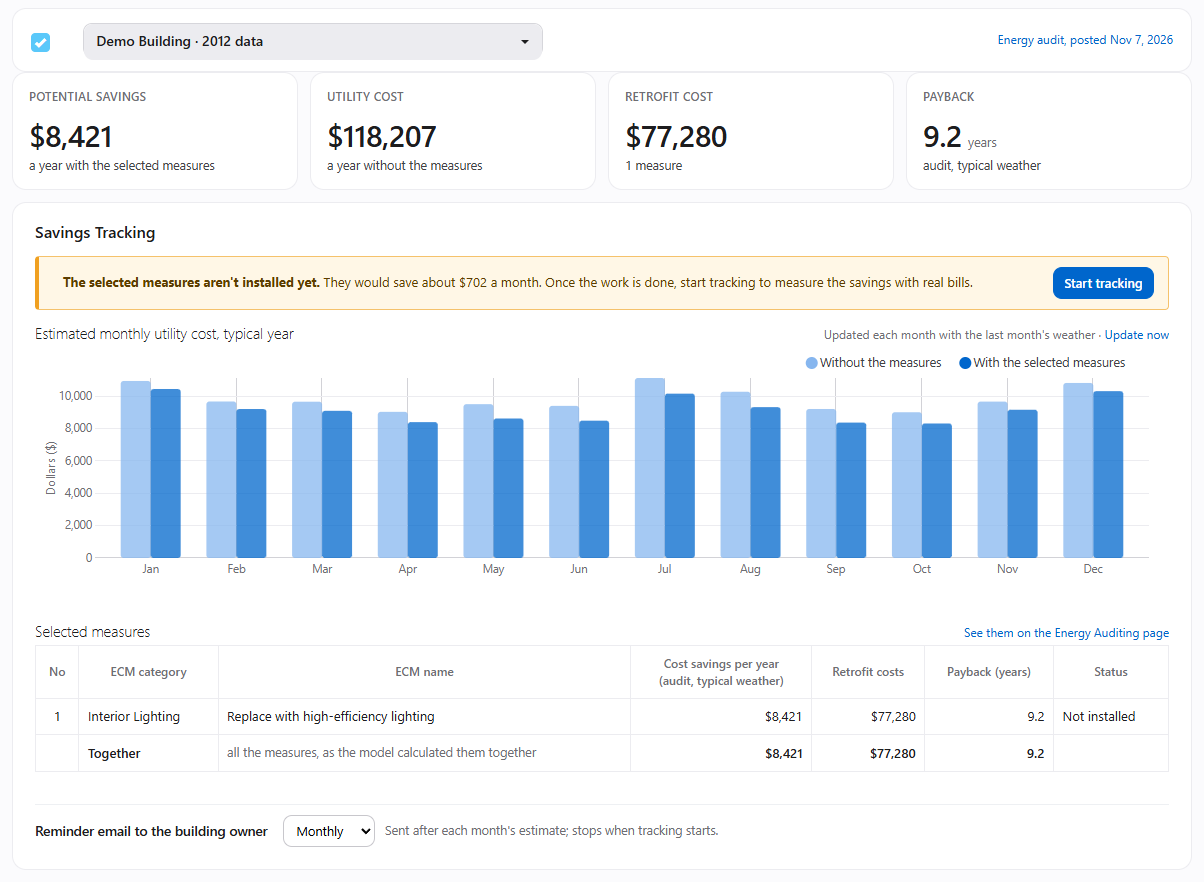
The picture shows the page before its first monthly estimate, with the audit’s typical year. From the first estimate on, the tiles and the chart show the last 12 months with their actual weather.
The monthly estimate
Each month, InverseAudit runs the building’s calibrated model with the last 12 months’ actual weather, without the measures and with the selected measures. The difference is what the measures would have saved. The audit’s own savings use a typical year; the estimate shows the same measures in the weather the building actually had.
The estimate updates by itself from the 10th of each month, with the month before. A month’s actual weather is used only from the 10th of the next month: in the first days after a month ends, the weather data for its last days can still be forecasts or averages instead of measurements.
To update it now, click Update now next to the chart. It takes a few minutes.
- From the 10th of the month, it covers the 12 months up to last month.
- Before the 10th, it covers the 12 months up to the month before last, the same as the last update. Last month is added from the 10th.
Weather that’s already downloaded isn’t downloaded again: each update adds only the days that are new.
Reminder emails
The reminders tell people what the selected measures would have saved with the last month’s weather, over the last 12 months, and since the audit was posted. They’re sent after each month’s estimate and stop when tracking starts.
- The building owner - The InverseAudit account that owns the building. Choose Monthly, Quarterly or Off under Reminder email to the building owner. Your choice is saved right away.
- Your client’s team - When the building has a client, each person on the client’s team gets their own copy, quarterly unless they change it on their own Savings Tracking page or unsubscribe. See What clients see.
Click Preview the email to see the reminder as it will be sent. It’s available once the first monthly estimate is made.
The monthly estimate and the reminders need an active subscription for the building. A month whose estimate fails is tried again the next day, up to three days a month.