
Start tracking and measure each year
Start tracking once the measures are installed, add each year’s bills, see the savings so far, calculate the year, share the results with your client, and end tracking when the measurement period is over.
For: AnalyzerTakes: A few minutes per calculationWhere: Analysis › Savings Tracking
On this page
Start tracking
- Click Start tracking under The selected measures aren’t installed yet.
- Under Measures installed, tick the measures that were installed. If your client marked measures Installed in their plan, those are ticked for you and tagged with what the client said, for example Client: installed Mar 2026.
- Under Work completed, enter the month the work was finished. Tracking years start the month after.
- Click Start tracking.
From then on, the building’s calibrated model is kept as it is, calibrated to its current data year. New baseline bills or a recalibration later don’t change the tracking. The monthly estimate and the reminder emails stop.
To change the installed measures or the completion month later, click Edit next to Measures installed under How it’s measured.
Started by mistake? While no bills are in, click Undo the start at the bottom of the page. The completion month and the installed measures are cleared, any empty tracking year is removed, and the monthly estimates and the reminders start again.
What the page shows while tracking
- Tiles - Savings achieved in the last measured year, with its share of the expected savings; Since the retrofit, all measured years together; Energy saved, the electricity and gas saved in the last measured year; and the Audit prediction, the audit’s savings a year with typical weather. Until a year is measured, the first three are empty.
- How it’s measured - The method and its four facts: the Baseline model (its data year and fit), the Measures installed and the completion month, the Weather (each year’s actual weather, and the station), and the Costs used to price the savings. See How savings are measured.
- Tracking years - One row for each 12-month year, with its bills and results.
- A year by month - The year you choose with View: a chart of the baseline and the actual bills each month, with Electricity (kWh) and Natural gas (therms) tabs when the building uses gas, and a table of the year’s totals.
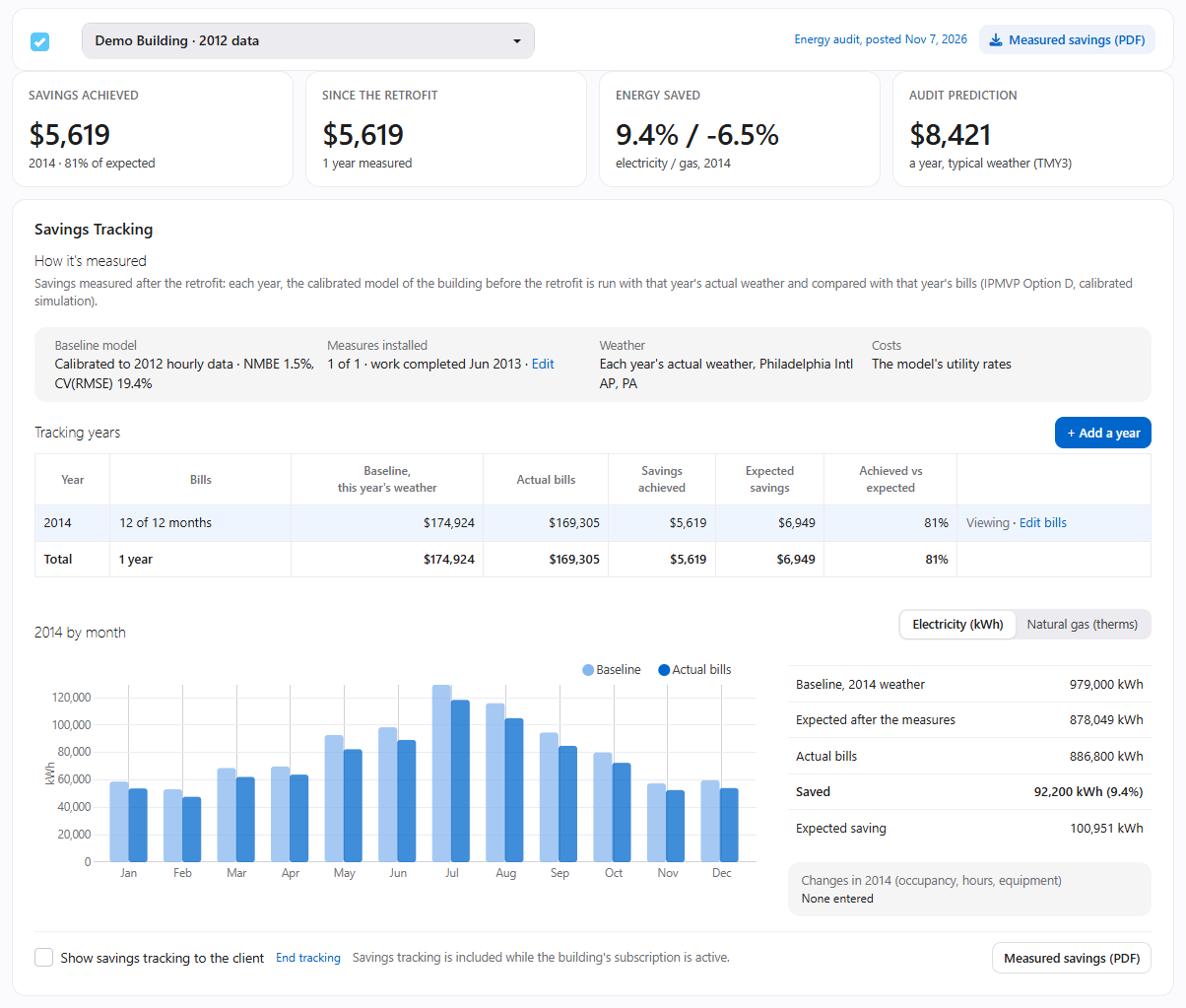
Tracking years
Click + Add a year to add the next 12 months. The first year starts the month after the work was completed, and each year after it a year later. The Bills dialog opens for the new year; see Enter a year’s bills.
| Column | What it shows |
|---|---|
| Year | The 12 months, marked Preliminary while only its months so far are measured |
| Bills | How many of the 12 months have their bills |
| Baseline, this year’s weather | What the building would have cost without the measures, in that year’s weather |
| Actual bills | What the bills’ use cost, at the same cost per unit |
| Savings achieved | Baseline minus actual bills |
| Expected savings | Baseline minus the model with the installed measures: what the measures should have saved in that year’s weather |
| Achieved vs expected | Savings achieved as a share of the expected savings |
The Total row adds up the measured years. Preliminary results aren’t included.
Each row’s links:
- Add bills or Edit bills - Opens the Bills dialog for the year.
- Update so far - Measures the year’s months so far. See Savings so far.
- Calculate - Measures the whole year. It shows once all 12 months are in.
- View - Shows the year by month below the table.
A year that isn’t measured yet says why: Needs all 12 months, Ready to calculate, Calculating… or Calculation failed.
Calculate a year
Once all 12 months have their bills, click Calculate on the year’s row, or Calculate in the Bills dialog. It takes a few minutes. InverseAudit runs the calibrated model with the year’s actual weather, without and with the installed measures, and compares both with the bills.
A year can be calculated once the weather for its last bill is final: 10 days after its last bill ends, when the bills have their last days of billing period, or else from the 10th of the month after the year’s last month. Until then, the Bills dialog says from which day. See When a year can be calculated.
When the year is measured and it’s shown to your client, InverseAudit offers to email them. See Share the results.
Savings so far
You don’t have to wait for the whole year. While a year is open, its months that have bills, one after the other from its first month and with final weather, can be measured already:
- Click Update so far on the year’s row. It shows when a new month is ready and the year can’t be calculated yet.
- From the 10th of each month, InverseAudit also updates the months so far by itself.
The row is marked Preliminary and its figures are in grey italics. View shows the months so far, with Preliminary: 5 of 12 months, for example, and the months without results empty.
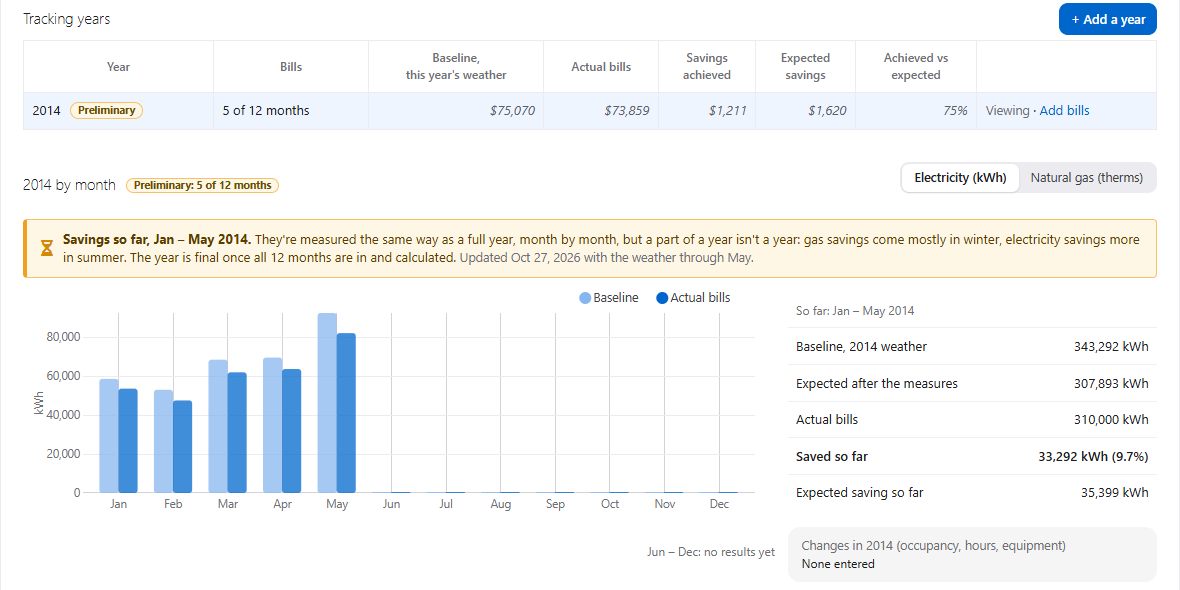
Savings so far are measured the same way as a full year, month by month, but a part of a year isn’t a year: gas savings come mostly in winter, and electricity savings more in summer. They aren’t scaled up to a year, and they’re left out of the tiles, the total, the PDF and the emails. The year is final once all 12 months are in and calculated.
If you change the bills of a month that’s already measured, the preliminary result is cleared until the next update.
When the bills cost more or less than the model
For buildings with monthly bills, the savings are priced at the model’s average cost per unit (see Costs). When a year’s bills average more than 2% more or less per unit than the model, the page says so, for example The 2026 bills cost more per unit than the model assumes, with both costs.
Click Rerun the baseline to price the measured years at the bills’ average cost per unit, so the savings are priced at what the building pays.
Share the results
- Show savings tracking to the client - Tick it at the bottom of the page. Your client then sees this page’s overview, read only, and the measured savings on their own Savings Tracking page. They always see the bills you enter. See What clients see.
- Email the client - Emails the last measured year’s savings to your client’s team, pointing them to their Savings Tracking page. It shows once a year is measured, the results are shown to the client, and the client’s company has people. It’s also offered right after a year is calculated.
- Measured savings (PDF) - Downloads the measured years, at the top or the bottom of the page.
End tracking
When the measurement period is over, click End tracking at the bottom of the page. The measured years stay as they are, and your client keeps seeing them while they’re shown. No new year or bills can be added, and no estimates or reminders are sent.
To continue later, click Resume tracking in the Savings tracking has ended notice.
If something goes wrong
Calculate doesn't show on the year's row
The year needs its bills for all 12 months. Open Add bills: the dialog’s footer says which months are missing, or from which day the year can be calculated.
"Calculation failed"
Click Calculate again. If it fails again, contact support with the building’s name and the year.
Start tracking or + Add a year is grayed out
The building’s subscription isn’t active. Savings tracking is included while it is. See Subscribe a building.