Calculate, update and post
Try measures on the calibrated model, refresh the report with the results, and post it for your contacts and clients.
For: AnalyzerTakes: A few minutes per runWhere: Analysis › Energy Audit › ECM Explorer
The baseline is calibrated, pinned and subscribed. See Run an energy audit.
Steps
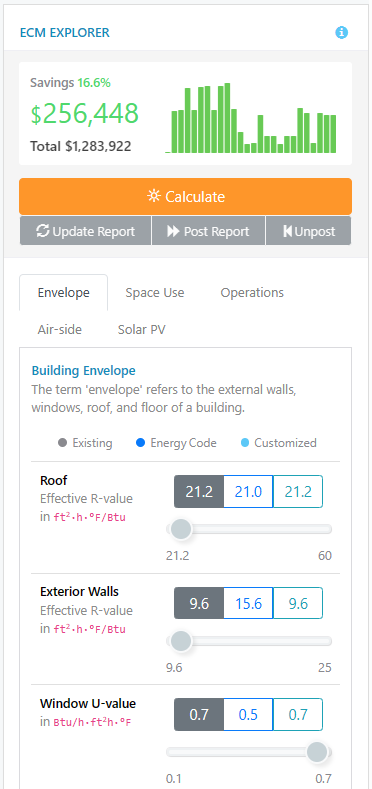
- In the ECM Explorer, choose the measures you want to apply by changing their values.
- Click Calculate. InverseAudit runs the simulation with the selected measures and shows the new savings. The report is marked “The report is outdated”.
- If the savings meet your expectations, click Update. The report is updated with the new results. This runs an energy simulation for each measure and can take several minutes.
- Optionally, click AI Analyze to rewrite the report’s text with AI. This replaces the text of every report section, including text you edited yourself.
- Check the report. If everything is in order, click Post.
When the buttons turn on
Each time you open the Energy Audit page, Update, AI Analyze and Post start grayed out.
- Update turns on when a Calculate finishes.
- Post and AI Analyze turn on when an Update finishes. Post also turns on when AI Analyze finishes.
- After Unpost, run Calculate and Update again before you can post.
To post an audit you updated during an earlier visit, run Calculate and Update again.
What you’ll see next
Your client can view the posted report (see What clients see), and the building appears on the Dashboard. The Utility analysis tab of the report becomes available.
After the audit is posted, Calculate is turned off. To make changes, click Unpost first. Unpost appears only after the audit has been posted.
If something goes wrong
"The report is outdated"
You calculated new measures but haven’t refreshed the report yet. Click Update in the ECM Explorer.
Calculate shows an error
Click Calculate again. If the error comes back, contact support with the baseline’s name.
Update or Post is grayed out
They turn on only after Calculate (for Update) and Update (for Post) finish during the current visit. See When the buttons turn on.
Calculate shows "Complete Your Energy Audit"
The baseline isn’t subscribed. The Energy Audit page also shows a Not subscribed banner. Subscribe the baseline, then calculate again.
Calculate is grayed out
The audit is posted, or you aren’t the baseline’s analyzer. If it’s posted, click Unpost first.