Check inputs and run calibration
The calibration tunes your building’s energy model until it matches your meter data. Every benchmark and audit result comes from the calibrated model.
For: AnalyzerTakes: 3 to 40 minutesWhere: Home › Baseline Controller
- All four cards on the baseline are complete: Meter Data, Geometry, Systems and Rates. None shows a Pending badge.
- You are the baseline’s analyzer. Other people see the controller in view-only mode.
Steps
- On Home, click the baseline’s card. In the Baseline Controller, click Check inputs. The check takes a few seconds and covers your inputs, historical weather data, incentive rates and retrofit costs. Anything that needs fixing is listed on the Issues tab.
- When the check passes, the button changes to Run calibration. Choose a Calibration length:
- Quick - About 3 minutes.
- Standard - About 20 minutes. Recommended.
- Thorough - About 40 minutes. Tests more combinations of model inputs.
- To get an email when it’s done, check Send me an email when ready. Then click Run calibration and confirm with Run Calibration.
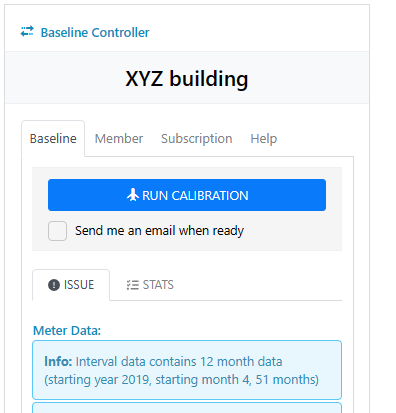
What you’ll see next
You can leave the page while the calibration runs. The button shows its progress, for example Calibration in progress (45%). When it finishes, it shows Calibration complete, and the Stats tab shows how closely the model matches your meter data:
| Meter data | CV(RMSE) | NMBE |
|---|---|---|
| Hourly | 30% or less | within ±10% |
| Monthly | 15% or less | within ±5% |
These are the ASHRAE Guideline 14 limits. See Read the calibration results. Next, open Benchmark to see the results.
Clicking Calibration complete lets you rerun the calibration. Rerunning deletes the current benchmark and energy audit results, and you’ll need to check inputs and run the calibration again.
If something goes wrong
The Check inputs button is grayed out
One of the four cards is still incomplete, or you aren’t the baseline’s analyzer. The line under the button says which inputs are missing.
I need to stop the calibration
Click the progress button and confirm with Stop Calibration. The progress is lost, but your inputs are kept, so you can run it again. If it just started, wait about 10 seconds before stopping it.
CV(RMSE) or NMBE is outside the limits
Check the meter data for gaps or outliers and confirm the systems and schedules. See Read the calibration results.
"Calibration failed"
Your inputs are saved. Run the calibration again. If it fails a second time, contact support with the baseline’s name.