Supported data formats
The meter data file formats InverseAudit can import, and how it reads kW and kWh.
We continuously add new formats. For questions or problems with a data import, contact support.
If your meter data file contains more than one year’s worth of data, our system will automatically use the latest one-year period.
Electricity
kW and kWh in interval meter data
Interval meter data typically presents energy consumption information in two key metrics: kilowatts (kW) and kilowatt-hours (kWh). Proper interpretation of these metrics is crucial for accurate energy analysis and billing.
Definitions
- kW (kilowatt): A measure of power, representing the rate of energy consumption at a given moment.
- kWh (kilowatt-hour): A measure of energy, representing the total amount of electricity consumed over a period of time.
Data conversion
When converting interval data to hourly figures:
- kW values are averaged to represent the mean power demand.
- kWh values are summed to represent the total energy consumption.
Critical Interpretation
Misinterpreting kW as kWh or vice versa can lead to significant errors in energy calculations:
- If 30-minute kW intervals are treated as kWh, annual energy consumption is overestimated by 100% (double the actual kWh).
- If 30-minute kWh intervals are treated as kW, annual energy consumption is underestimated by 50% (half the actual kWh).
These errors, when propagated over extended periods, can result in substantial discrepancies in energy analysis.
Data formats for InverseAudit
InverseAudit supports two major data formats: Green Button and CSV. This manual outlines the specifications for each format and how they are handled by the system.
Green Button format
The Green Button is a standardized data format designed for easy and secure access to energy usage data.
- Format: Standardized, machine-readable
- Purpose: Allows utility customers to access their energy usage data in a consumer-friendly format
- Handling: InverseAudit consumes Green Button data without any modification
CSV (comma-separated values) format
CSV is a common output format for spreadsheet programs. InverseAudit supports two types of CSV formats and can automatically recognize the type.
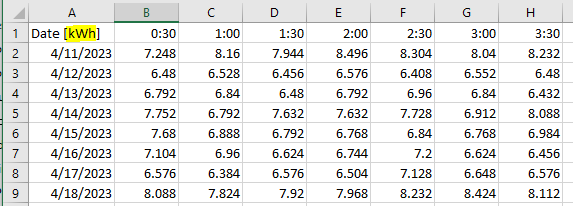
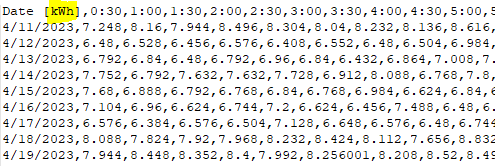
Horizontal CSV format
- Structure: Horizontal header shows time, First column shows date
- Default Unit: kW
- Unit Specification: If needed, include “kWh” or “kW” in the first cell of the first column
- File Extension: .csv
Vertical CSV format
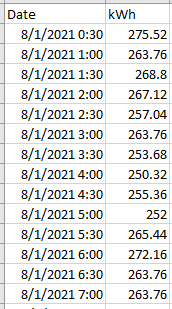
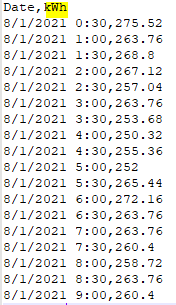
InverseAudit supports two variations of the vertical format:
Two-column format
- Column 1: Date and time combined
- Column 2: Electricity usage data
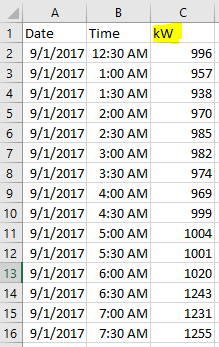
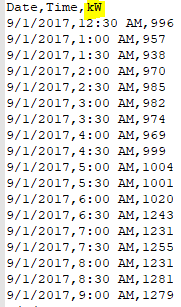
Three-column format
- Column 1: Date
- Column 2: Time
- Column 3: Electricity usage data
Data import process
InverseAudit automatically detects the format of the imported file (Green Button or CSV). For CSV files, the system determines whether it’s a horizontal or vertical format. The data is then processed according to the identified format.
Best practices
- Keep the data consistent within each file.
- For CSV files, keep the structure described above.
- With the horizontal CSV format, specify the unit (kW or kWh) if it differs from the default.
Natural gas and fuel oil
There’s no file format for natural gas or fuel oil. Enter the monthly use (therms for natural gas, gallons for fuel oil) on the Natural Gas/Fuel Oil tab of the Meter Data window, or import your bills with AI on its first tab. See Meter data.
District chilled water
| Company | Reference | Format | Interval | Tested |
|---|---|---|---|---|
| InverseAudit | - | csv (comma-separated values) | 60 mins | Yes |
District steam
| Company | Reference | Format | Interval | Tested |
|---|---|---|---|---|
| InverseAudit | - | csv (comma-separated values) | 60 mins | Yes |